

Collect Data
We securely collect data from your vehicles, drivers, sensors, and systems in real time.
FleetOps connects real-world data, applies intelligence, and turns it into actions that keep your fleet safe, efficient, and productive.
 Secure by Design
End-to-end security and data protection.
Secure by Design
End-to-end security and data protection. Real-time Visibility
Live location, events and performance.
Real-time Visibility
Live location, events and performance. Intelligent Automation
Workflows, alerts and decisions.
Intelligent Automation
Workflows, alerts and decisions. Actionable Insights
Dashboards, reports and recommendations.
Actionable Insights
Dashboards, reports and recommendations.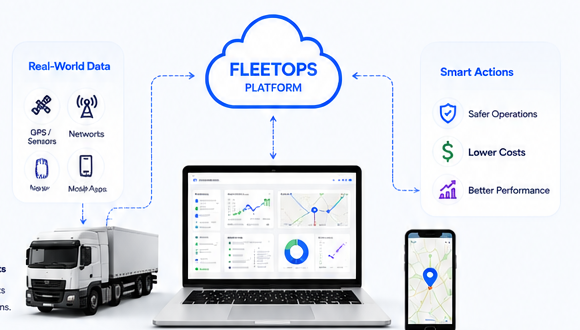
We securely collect data from your vehicles, drivers, sensors, and systems in real time.

Data is cleaned, validated, and organized to ensure accuracy and reliability.

Our intelligence engine finds patterns, detects events, and highlights what matters.

Rules and workflows trigger alerts, notifications, and tasks—automatically.

See everything in real time with dashboards, maps, and reports that are easy to understand.

Measure results, uncover opportunities, and keep improving your operations every day.


This page should stay practical and reader-friendly.

Create routes, schedules, assignments, and operational expectations.

Send the right vehicle and driver to the right job.

Drivers and field personnel receive work through FleetPilot.

FleetMaster tracks vehicles, status, progress, and exceptions.

ASSIST can coordinate governed follow-up when something requires action.

Reports and operational history help the team refine performance.
FleetOps is the platform layer. FleetMaster is the operations workspace. FleetPilot is the driver and field experience. Tracker keeps assets visible. ASSIST coordinates operational workflows when events need governed follow-up.
 FleetMaster
Office and operations teams manage the day.
FleetMaster
Office and operations teams manage the day. FleetPilot
Drivers and field users execute assigned work.
FleetPilot
Drivers and field users execute assigned work. Tracker
Vehicles and assets provide location and operational signals.
Tracker
Vehicles and assets provide location and operational signals. ASSIST
Events become coordinated workflows, approvals, actions, and records.
ASSIST
Events become coordinated workflows, approvals, actions, and records.
Use the overview page to introduce the platform, then link visitors to deeper product pages.